


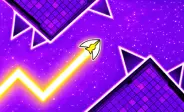
Space Waves
Fill the form and submit.







How To Play
Plan your moves early because the arrow needs time to change height. Watch the path ahead and prepare before reaching walls, turns, or raised sections. When you see circular spikes, staying below them can be a safer choice.
Game Modes
Controls
- Mouse or Keyboard: Use your controls to move the arrow up and down.
- Avoid Obstacles: Stay away from walls, cogs, and other objects.
- Watch the Path: Look ahead so you have time to prepare for turns.
- Choose Levels: Pick from 33 levels with different difficulty ratings.
Tips And Tricks
- Practice Zigzag Movement: Many sections require regular movement between the top and bottom of the path. Try to keep your movements smooth instead of making sudden changes.
- Time Your Moves: Watch upcoming peaks, valleys, and gaps. Begin moving early so the arrow reaches the correct height before you reach the obstacle.
- Use Practice Mode: Difficult sections become easier when you can practice them without restarting the entire level after every mistake.
- Watch Your Progress: After crashing, check how far you reached. This can help you identify difficult sections and focus your practice on them.
- Use Resume Carefully: Some crashes may offer a chance to continue from your previous position. This option may require watching an ad and is usually limited.
More Games Like This
Players who enjoy quick browser challenges can also try Slice Master, Electron Dash, and Death Run 3D. Each game offers a different style of fast gameplay, from obstacle courses to endless challenges. Exploring casual browser games can also help you find more titles that are easy to start and fun to replay.
FAQs
Can You Customize The Arrow?
Yes. Players can change the appearance of their arrow using different designs. Options can include fiery, rounded, and colorful arrow styles.
How Many Levels Are Available In Space Waves?
The game features 33 levels, with different layouts and difficulty ratings. Players can choose easier stages first and move to harder challenges as their skills improve.
What Happens When You Crash?
When you crash into an obstacle, the run ends. The game can also show how far you progressed through the level, helping you find sections that need more practice.





Play Slope and the best unblocked ball-rolling games free in your browser. No downloads, works on Chromebook.


Popular Games
Categories
Company